Adding a Bot to a Group Chat
If your use case involves group chats, the Bot must first join the target group before it can participate in commands, messages, and callbacks.
Note: TypeX Bot supports both group chat and one-on-one chat. You only need to perform this step if the Bot needs to interact within a group.
Method 1: Add via Client
If you are a group owner or admin, you can add the Bot to a group directly from the client's group management panel. This is the recommended approach for beginners.
Method 2: Add via API
If you need automation, you can also add the Bot to a group through the open API. See the Open API section for parameters and request examples.
Note:
- Whether the Bot can be directly invited depends on its configuration
- If your scenario involves special group permissions or encryption restrictions, check the group settings first
End-to-End Encrypted Session Restrictions
TypeX supports end-to-end encrypted conversations.
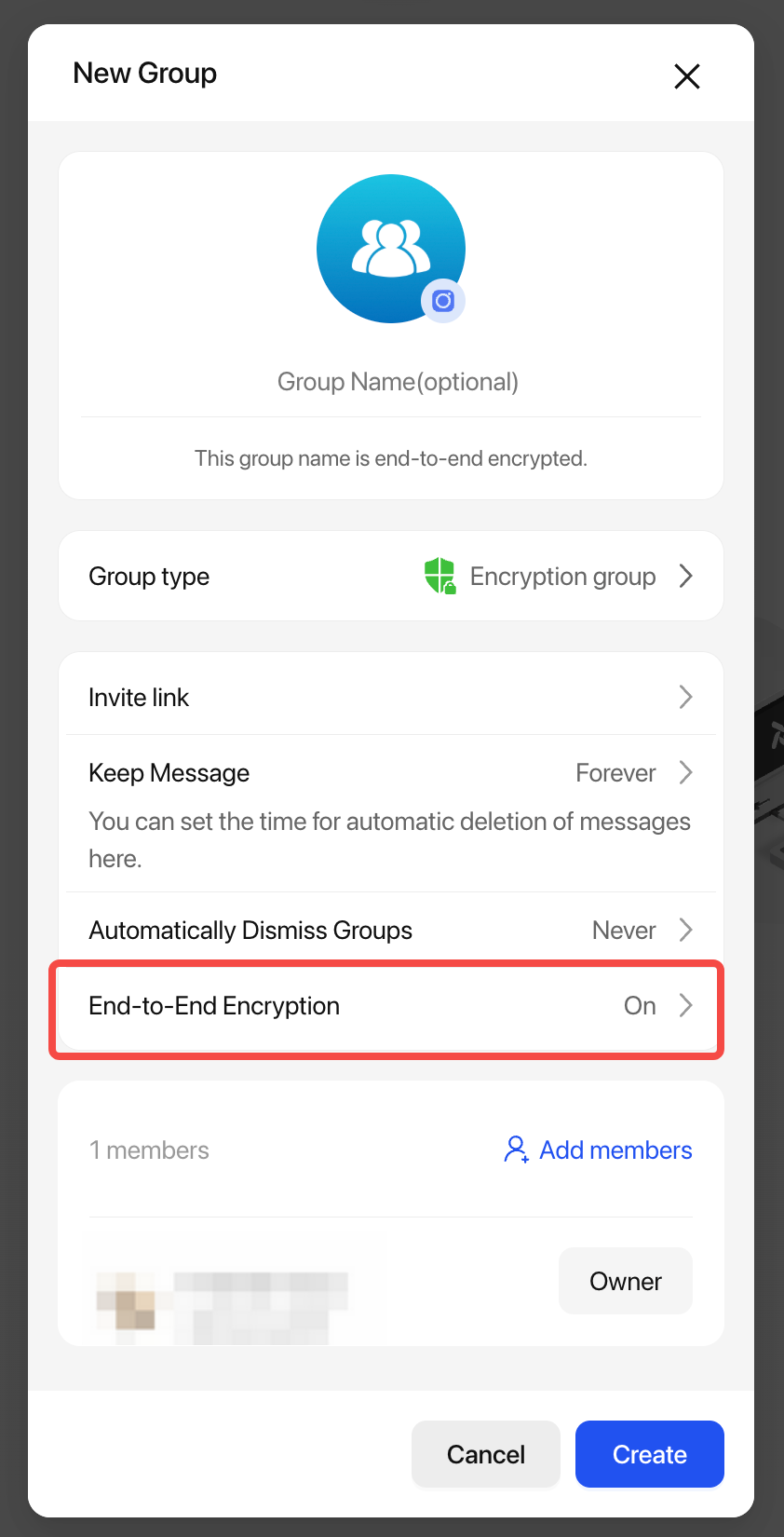
⚠️ End-to-end encrypted messages in group chats cannot be decrypted by the Bot. In such sessions, the Bot cannot process commands.
Pay attention to the encryption toggle when creating a group:
- Encryption ON: The Bot will not receive any message events
- Encryption OFF: Commands work normally